Kubernetes for ML Engineering, Part 2: Isolation — Networking and RBAC
Introduction
In the last post, I set up a two-service architecture, containing a frontend dashboard, and a backend API. My demo included the K8s Deployment setup, the frontend NodePort service type, and covered some of the similarities of Kubernetes to AWS ECS, the platform I’m very familiar with.
In this post, I’ll expand on topics related to authentication, authorization, and networking. See below for a rough architecture diagram of this post’s content. Again, this is not a tutorial. This is a series of posts documenting my path to development with Kubernetes. In each post, I’ll progressively integrate more and more K8s functionality, culminating in an application towards ML training and inference pipelines.
Code for this post can be found here.
Architecture and Overview
The theme of this post is networking, roles, and permission boundaries. A shared cluster has multiple boundaries that matter:
- the networking path between workloads
- the permission surface against the K8s API server
- the rules dictating cluster access (though technically, we could offload this to outside the cluster itself)
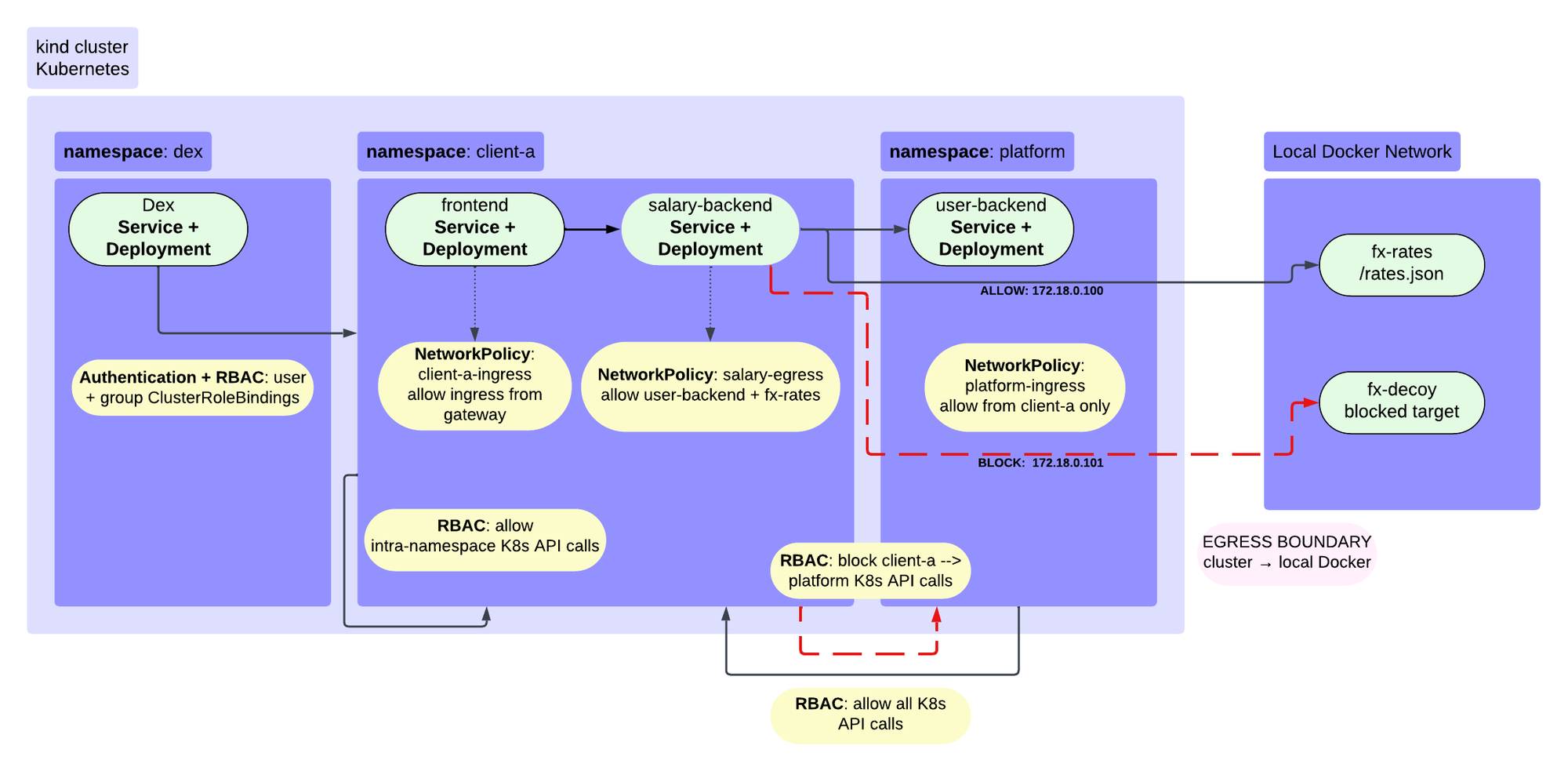
Given the networking theme, we need a service architecture that requires these types of components. We’ll have a few services this time, spanning different namespaces and permissions boundaries:
- frontend service: displays user and user salary information via Python Dash application
- salary service: gets salary data associated with users
- users service: gets personal information about users
- rates “service”: applies currency transforms to salaries
- Dex service: mocks OIDC authentication
Part One: the network
Services across namespaces
The frontend and salary API exist in the client-a namespace, and the user API exists in the platform namespace. We can envision these two services as something a specific tenant or team might want to deploy. The salary API has within-namespace endpoints (e.g. access data within its own Pod), and across-namespace endpoints (e.g. calls users API in the platform namespace, calls rates service outside cluster).
Like we demonstrated last time, services within a namespace can resolve one another using the service names themselves. However, across namespaces, for one service to find another, we need DNS resolution. This means that, within the client-a namespace, “salary-backend” resolves just fine, but “users-backend” does not. In order for the salary service to find the users service, we need to provide the full A Record (since it maps directly to an IP address) user-backend.platform.svc.cluster.local as an environment variable in the client-a ConfigMap (since ConfigMaps are namespace-scoped).
apiVersion: v1
kind: ConfigMap
metadata:
  name: client-a
  namespace: client-a
data:
  # user-backend lives in the `platform` namespace, so the short name won't resolve from here
  user_backend_url: "http://user-backend.platform.svc.cluster.local:8000"
  salary_backend_url: "http://salary-backend:8001"
  # set to http://172.18.0.101 (fx-decoy), egress policy will block that access
  fx_url: "http://172.18.0.100"
To address some of those concerns, we’ve set up a few roles: We’ve got a few different roles associated with this architecture:
- platform role (ClusterRole)
- client-a role (ClusterRole, restricted to namespace)
- observer role (ClusterRole, minimal permissions)
To handle the rules dictating cluster access, we’ve also implemented a system for creating users, setting up OIDC authentication, and establishing mTLS for cluster access using Dex.
Why are we even concerned with all of this? In a production grade ML system, we’ll likely have a multi-tenant architecture, with multiple tenants setting up their own training and inference systems. We’ll need a platform or admin-scoped role that let’s us control the cluster, and we’ll likely also want some roles related to observing the system, scoped more narrowly than the platform roles and restricted primarily to accessing logs.
Ingress and the Gateway API
Initially, I built this out using the IngressController but quickly saw that in a real-world application, this would become chaotic. Each IngressController belongs to its own namespace and sets up both the infrastructure and the network rules. Any change to any of those components requires rebuilding the entire resource suite.
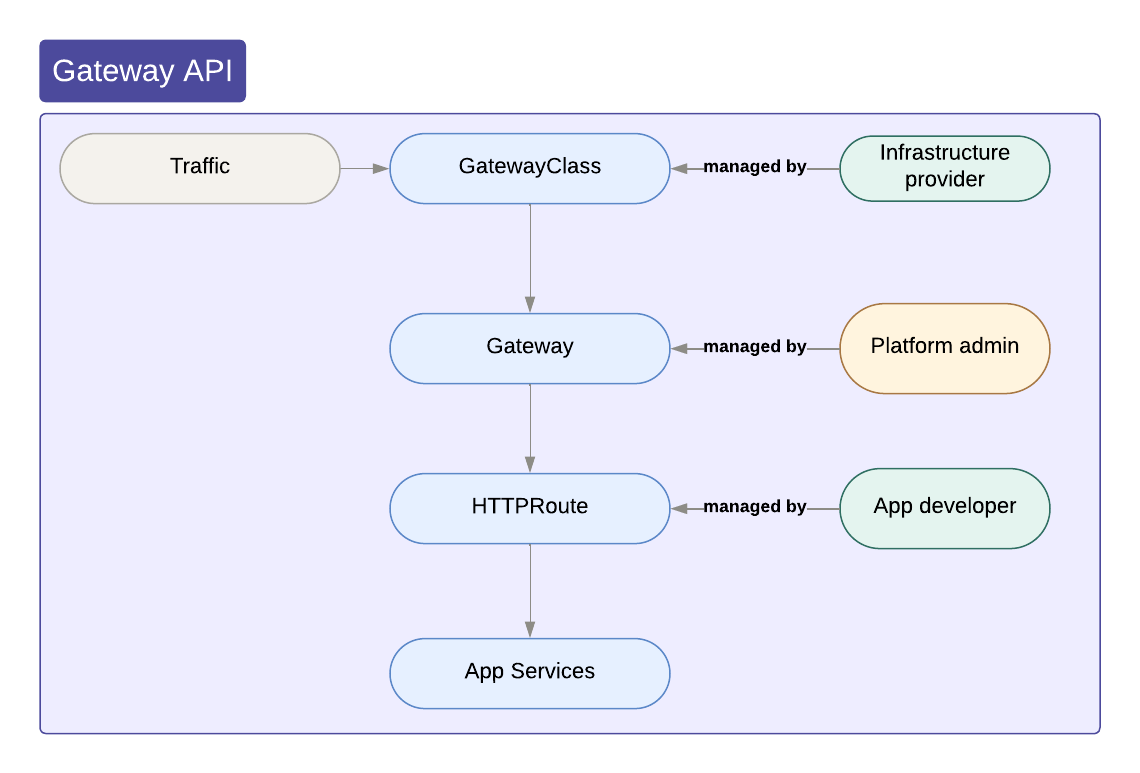
I switched to using the Gateway Class, GatewayAPI, and HTTPRoute resources. GatewayClass is a cluster-scoped definition of the routing, while the GatewayAPI is a namespace-scoped instance of that infrastructure. The HTTPRoute resources mirror the “path” rules of the IngressControllers. If we want to add new paths, or additional rules, we set up new routes or route types, and these are automatically picked up by the GatewayAPI infrastructure (assuming label selectors are defined correctly). This quickly allows individual teams to deploy their own applications without disrupting existing services.
I set the Gateway up in the platform namespace to only accept routes from namespaces with specific labels e.g. “tier=platform” or “tier=tenant”. I created a “fake” hostname called “apps.part-2.test”, and created an entry for this in my local /etc/hosts file. Only the frontend paths are exposed. The frontend-service HTTPRoute lives in the client-a namespace, and attaches to the Gateway vie the parentRefs name + namespace label selectors.
# would be owned by the platform / admin team
apiVersion: gateway.networking.k8s.io/v1
kind: Gateway
metadata:
  name: apps
  namespace: platform
spec:
  gatewayClassName: envoy-gateway
  listeners:
  - name: http
    protocol: HTTP
    port: 8080
    hostname: apps.part-2.test
    allowedRoutes:
      namespaces:
        from: Selector
        selector:
          matchExpressions:
          - key: tier
            operator: In
            values: [platform, tenant]

---
# only frontend is exposed outside the cluster
# attaches to platform-owned Gateway
apiVersion: gateway.networking.k8s.io/v1
kind: HTTPRoute
metadata:
  name: frontend
  namespace: client-a
spec:
  parentRefs:
  - name: apps
    namespace: platform
  hostnames:
  - apps.part-2.test
  rules:
  - matches:
    - path:
        type: PathPrefix
        value: /frontend
    backendRefs:
    - name: part-2-frontend
      port: 8050
NetworkPolicy
We want to follow the principle of least privilege. Without any explicit policies, every Pod can reach every other Pod in every namespace. This obviously should not happen. One team’s services should not be able to call another team’s services unless that communication is explicitly allowed. We also don’t want non-admin resources to be able to access admin / platform resources directly.
To make these rules explicit, we use NetworkPolicy resources. NetworkPolicies can set rules at the Pod or Namespace level using label selectors, and/or at the CIDR level, and can specify Ingress and Egress rules. Anything that isn’t explicitly allowed, is denied. For our architecture, we have the following needs:
- frontend (
client-anamespace) can be accessed from outside cluster via the Gateway (platformnamespace) - frontend (
client-anamespace) needs to be able to call salary API (client-anamespace) - salary API (
client-anamespace) needs to be able to call user API (platformnamespace) - salary API needs to be able to call the fx-rates service (outside cluster)
client-a-ingress: frontend is only reachable through the gateway
apiVersion: networking.k8s.io/v1
kind: NetworkPolicy
metadata:
  name: client-a-ingress
  namespace: client-a
spec:
  podSelector:
    matchLabels:
      app: part-2-frontend
  policyTypes:
  - Ingress
  ingress:
  - from:
    # for the gateway api
    - namespaceSelector:
        matchLabels:
          kubernetes.io/metadata.name: envoy-gateway-system
    # for the nginx ingress controller (if we want to test both)
    - namespaceSelector:
        matchLabels:
          kubernetes.io/metadata.name: ingress-nginx
    ports:
    - protocol: TCP
      port: 8050
Ingress traffic will explicitly come through the Gateway, so we need to only allow this traffic (envoy-gateway-system namespace).
salary-egress: what salary-backend can call
# salary-backend is reachable only from the frontend, and can only call
# user-backend, the fx-rates container, and cluster DNS
apiVersion: networking.k8s.io/v1
kind: NetworkPolicy
metadata:
  name: salary-egress
  namespace: client-a
spec:
  podSelector:
    matchLabels:
      app: part-2-salary
  policyTypes:
  - Ingress
  - Egress
  ingress:
  # allow ingress from frontend (same namespace)
  - from:
    - podSelector:
        matchLabels:
          app: part-2-frontend
    # specify the ports
    ports:
    - protocol: TCP
      port: 8001

  egress:
    # DNS so user-backend.platform.svc.cluster.local resolves from salary backend
    - to:
      - namespaceSelector:
          matchLabels:
            kubernetes.io/metadata.name: kube-system
        podSelector:
          matchLabels:
            k8s-app: kube-dns
      ports:
      - protocol: UDP
        port: 53
      - protocol: TCP
        port: 53

    # fx-rates sits outside the cluster
    # the fx-decoy IP (172.18.0.101) isn't listed so it's blocked
    - to:
      - ipBlock:
          cidr: 172.18.0.100/32
      ports:
      - protocol: TCP
        port: 80

    # user-backend in the platform namespace
    - to:
      - namespaceSelector:
          matchLabels:
            kubernetes.io/metadata.name: platform
        podSelector:
          matchLabels:
            app: part-2-users
      ports:
      - protocol: TCP
        port: 8000
We have to allow egress from the salary service to the kube-system namespace so that DNS resolution of the user API works correctly (remember cross-namespace service calls). We also specifically allow egress from the salary service to the 172.18.0.100/32 CIDR range, which just maps to the IP address 172.18.0.100, where the fx-rates services is running in the Docker network but outside of the Kind cluster.
platform-ingress: user-backend only accepts calls from client-a’s salary-backend
# user-backend is reachable only from client-a's salary-backend
# The frontend's direct call to user-backend is blocked here on purpose, so the dashboard
# shows one blocked edge next to the allowed ones.
apiVersion: networking.k8s.io/v1
kind: NetworkPolicy
metadata:
  name: platform-ingress
  namespace: platform
spec:
  podSelector:
    matchLabels:
      app: part-2-users
  policyTypes:
  - Ingress
  - Egress
  ingress:
  - from:
    - namespaceSelector:
        matchLabels:
          kubernetes.io/metadata.name: client-a
      podSelector:
        matchLabels:
          app: part-2-salary
    ports:
    - protocol: TCP
      port: 8000
  # no egress rules, user-backend doesn't make outbound calls
Here, the namespaceSelector and the podSelector are one “block” e.g. form an “AND” rule, meaning that we only allow ingress from things both in the client-a namespace AND the part-2-salary app.
Watching the policies work
Belong are two demonstrations of querying a user. I’ve set up two user request patterns:
- frontend requests user API directly: this is explicitly not allowed via the NetworkPolicies
- frontend requests salary API, which requests user API: this is allowed via the NetworkPolicies
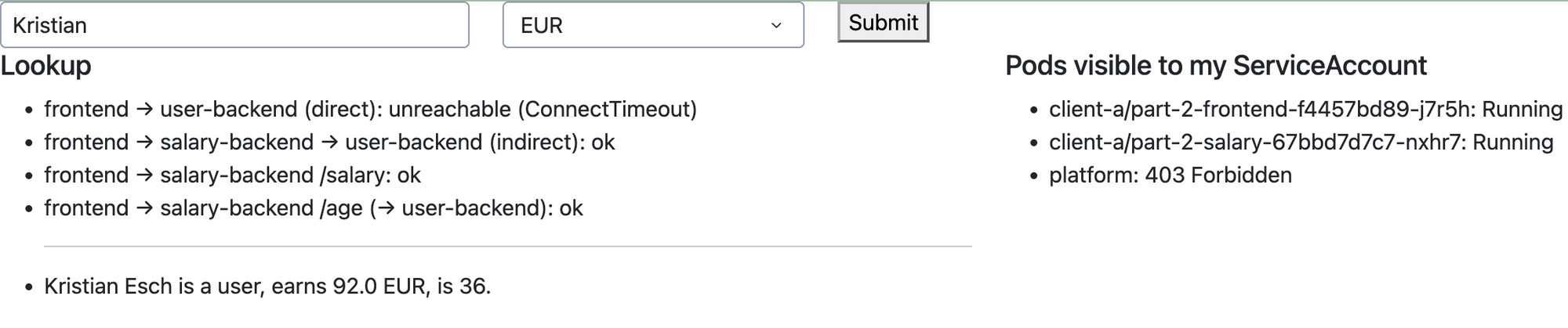
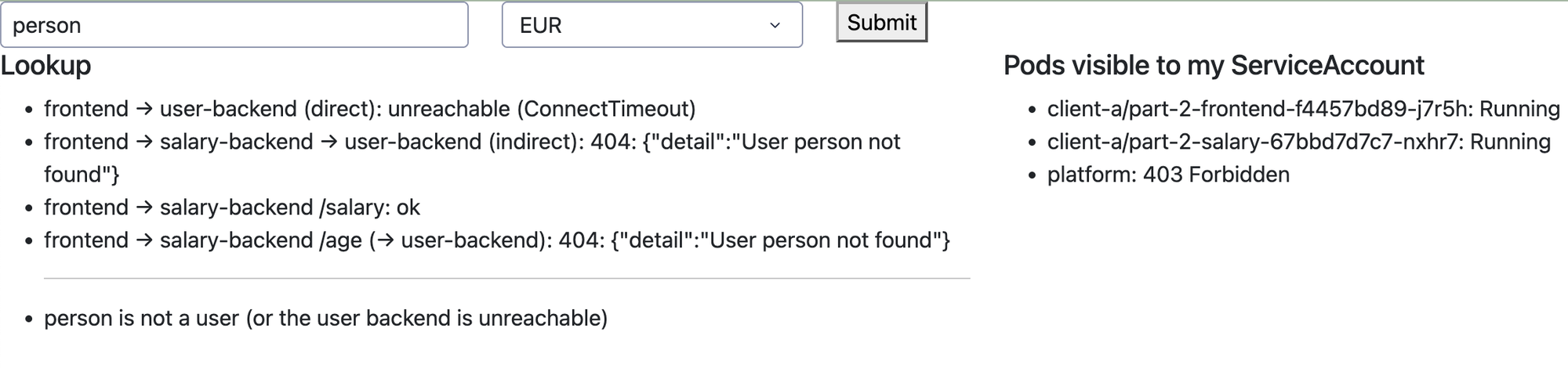
We can also see that a pod in the platform namespace is not visible to the pod in the client-a namespace – this is the consequence of the RBAC (see below).
Part Two: Identity and the API server
The RBAC objects and how they relate
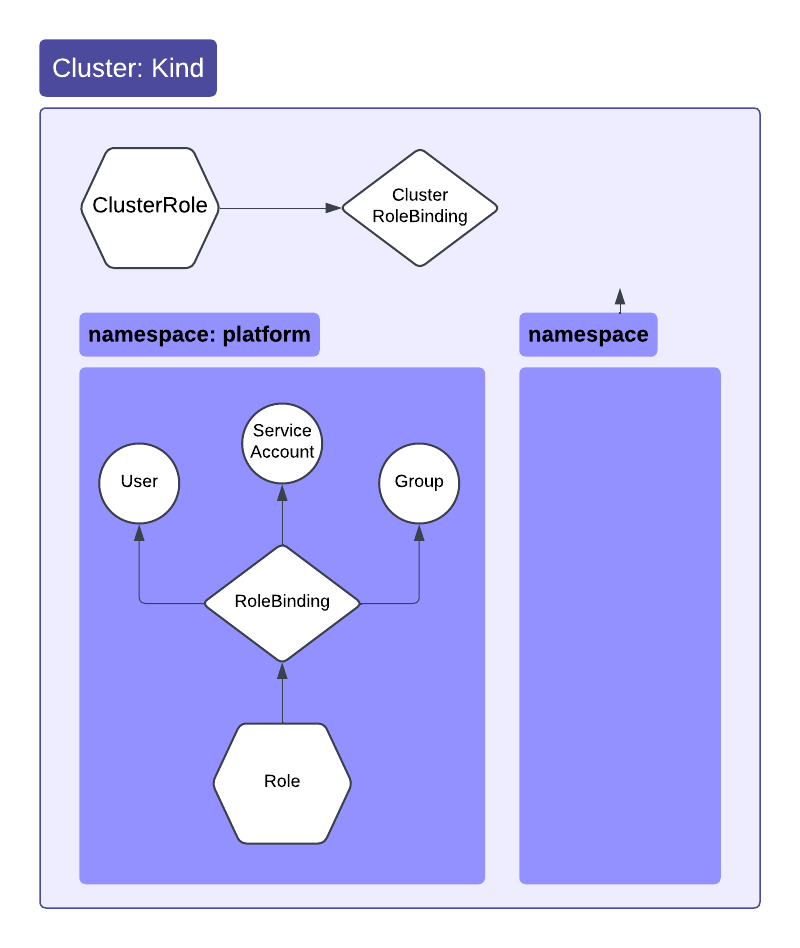
I explored RBAC in more depth here, incorporating Roles, ClusterRoles, RoleBindings, and ClusterRoleBindings. Roles + RoleBindings are namespace restricted – they only apply to objects within the namespace to which they belong. ClusterRoles + ClusterRoleBindings can be scoped to the entire cluster or they can be scoped to a specific namespace. The domain of role permissions for ClusterRoles is more expansive than those of Roles. ClusterRoles allow access to cluster-scopes resources e.g. Nodes, PersistentVolumes, while Roles restrict permissions to resources within a namespace e.g. ConfigMaps, Pods, Services.
Authenticating people with Dex
Generally, we want to limit what a user can do based on what groups they belong to. In my current corporate environment, we have an external IdP and use AWS Cognito for authentication. K8s doesn’t have a “User” resource, so we need to authenticate and authorize outside the cluster. I’m using a tool called Dex, which acts as a mocked IdP + OIDC server. I created three different users, and associated each with a unique “group”. When creating the Kind cluster, we can provide some additional parameters pointing at the Dex service, such as a self-signed Certificate Authority (CA) file.
In the cluster manifest file, we’d point at the OIDC issuer URL (here a local Dex service running in the cluster, in its own namespace), indicate how a user will login (oidc-username-claim), indicate how we assign users to groups (oidc-groups-claim), and point at the certs file (oidc-ca-file).
# cluster.yaml
...
    kind: ClusterConfiguration
    apiServer:
      extraArgs:
        # Must be https and must match `issuer` in dex-config.yaml exactly.
        oidc-issuer-url: "https://kind-control-plane:32000"
        oidc-client-id: "kubernetes"
        oidc-username-claim: "email"
        oidc-groups-claim: "groups"
        oidc-ca-file: "/etc/kubernetes/dex/ca.crt"
      extraVolumes:
      - name: dex-ca
        hostPath: /etc/kubernetes/dex/ca.crt
        mountPath: /etc/kubernetes/dex/ca.crt
        readOnly: true
        pathType: File
...
# dex-config.yaml
# has to match the oidc-issuer-url in cluster.yaml exactly.
issuer: https://kind-control-plane:32000
storage:
type: memory
web:
https: 0.0.0.0:5556
tlsCert: /etc/dex/tls/tls.crt
tlsKey: /etc/dex/tls/tls.key
staticClients:
- id: kubernetes
redirectURIs:
# kubelogin's default local callback ports
- http://localhost:8000
- http://localhost:18000
name: 'Kubernetes CLI'
secret: ZXhhbXBsZS1hcHAtc2VjcmV0
enablePasswordDB: true
staticPasswords:
- email: "admin@example.com"
# Clean pre-compiled bcrypt hash for 'password'
hash: "$2a$10$2b2cU8CPhOTaGrs1HRQuAueS7JTT5ZHsHSzYiFPm1leZck7Mc8T4W"
username: "platform-admin"
userID: "admin-id-001"
groups:
- "platform-admins"
- email: "client-a@example.com"
hash: "$2a$10$2b2cU8CPhOTaGrs1HRQuAueS7JTT5ZHsHSzYiFPm1leZck7Mc8T4W"
username: "client-a-user"
userID: "client-a-id-002"
groups:
- "clients-a"
- email: "observer@example.com"
hash: "$2a$10$2b2cU8CPhOTaGrs1HRQuAueS7JTT5ZHsHSzYiFPm1leZck7Mc8T4W"
username: "global-observer"
userID: "observer-id-003"
groups:
- "observers"We created three users: platform-admin, client-a-user, and global-observer, each with their own email, password, and groups. The groups determine
Authorizing people: three groups, three bindings
For each Dex group (again, a stand-in for groups provided by your own IdP), you can assign ClusterRoles or Roles. We have three group + role combinations:
# cluster-roles.yaml

# platform admin has full global admin cluster-wide
apiVersion: rbac.authorization.k8s.io/v1
kind: ClusterRoleBinding
metadata:
  name: oidc-platform-admin-binding
subjects:
- kind: Group
  name: "platform-admins" # for Dex
  apiGroup: rbac.authorization.k8s.io
roleRef:
  kind: ClusterRole
  name: cluster-admin # K8s superuser role
  apiGroup: rbac.authorization.k8s.io

---
# client-a isolated to it's namespace
apiVersion: rbac.authorization.k8s.io/v1
kind: RoleBinding
metadata:
  name: oidc-client-a-binding
  namespace: client-a # namespace-restricted
subjects:
- kind: Group
  name: "clients-a"  # for Dex
  apiGroup: rbac.authorization.k8s.io
roleRef:
  kind: ClusterRole
  name: edit # K8s role allowing read/write on workloads, but no RBAC manipulation
  apiGroup: rbac.authorization.k8s.io

---
# observer has cluster-wide read-only access
apiVersion: rbac.authorization.k8s.io/v1
kind: ClusterRoleBinding
metadata:
  name: oidc-observer-binding
subjects:
- kind: Group
  name: "observers" # for Dex
  apiGroup: rbac.authorization.k8s.io
roleRef:
  kind: ClusterRole
  name: view #  K8s role allowing global read-only access
  apiGroup: rbac.authorization.k8s.io
The cluster-admin and observer roles can access resources across the whole cluster via a ClusterRoleBinding, while we’ve restricted the client-a role to the client-a namespace via a RoleBinding.
Authorizing workloads: the frontend’s ServiceAccount
I wanted to demonstrate RBAC in action, and built this in to the dashboard itself. The frontend’s pod panel (pods.py) lists pods with the frontend’s own ServiceAccount token. The pod-reader Role and RoleBinding allow that in client-a namespace only, so the panel shows client-a pods and a 403 platform pods.
# roles.yaml

#### service accounts for each namespace
apiVersion: v1
kind: ServiceAccount
metadata:
  name: user-backend-sa
  namespace: platform
# the backends never call the API server, so don't mount a token
automountServiceAccountToken: false

---
apiVersion: v1
kind: ServiceAccount
metadata:
  name: salary-backend-sa
  namespace: client-a
automountServiceAccountToken: false

---
apiVersion: v1
kind: ServiceAccount
metadata:
  name: part-2-frontend-sa
  namespace: client-a

---
apiVersion: v1
kind: ServiceAccount
metadata:
  name: observer-sa
  namespace: observer

---
#### frontend callback list pods in its own namespace (src/frontend/pods.py).
apiVersion: rbac.authorization.k8s.io/v1
kind: Role
metadata:
  name: pod-reader
  namespace: client-a
rules:
- apiGroups: [""] # "" indicates the core API group
  resources: ["pods"]
  verbs: ["get", "watch", "list"]

---
apiVersion: rbac.authorization.k8s.io/v1
kind: RoleBinding
metadata:
  name: part-2-frontend-pod-reader
  namespace: client-a
subjects:
- kind: ServiceAccount
  name: part-2-frontend-sa
  namespace: client-a
roleRef:
  kind: Role
  name: pod-reader
  apiGroup: rbac.authorization.k8s.io
Testing it
To see if the RBAC are working as we expect them to, we can run some tests impersonating a user in a specific group:
# people (OIDC groups)
kubectl auth can-i create deployments -n client-a --as=client-a@example.com --as-group=clients-a
kubectl auth can-i create deployments -n platform --as=client-a@example.com --as-group=clients-a
kubectl auth can-i list secrets -A --as=observer@example.com --as-group=observers

# workloads (ServiceAccounts)
kubectl auth can-i list pods -n client-a --as=system:serviceaccount:client-a:part-2-frontend-sa
kubectl auth can-i list pods -n platform --as=system:serviceaccount:client-a:part-2-frontend-sa
Wrapping up
Sources of Confusion
Ingress vs. Gateway: I got hung up at first on how the GatewayClass + GatewayAPI + HTTPRoute approach differed from the Ingress + IngressController approach, and why exactly the Gateway approach was superior. However, once I understood that the Gateway approach allowed decoupling of the infrastructure from the routing rules, and how this enabled isolation across teams / clients / tenants, it made much more sense.
Dex and OIDC: while not stritly specific to K8s, I had to read a number of blog posts about Dex to understand how exactly to incorporate the OIDC mocking into this architecture. It took me a while to wrap my head around the different communication flows. The tls.crt file is provided by the Dex pod once to the local host (via
kubelogin) and again to the K8s API server. The ca.crt file needs to exist on both the local host, and in the cluster (with--oidc-ca-file flag). The private keys aren’t shared anywhere. There are two handshakes: one for user authentication with Dex, and another to identify Dex to the API server, so the API server can verify the user JWT.
What’s next
So far we’ve built stateless services. These accept requests and return responses without long-lived state. Model training is different, in that we’ll want to log training performance, and generate various artefacts along the way.
In next post, I’ll cover K8s Jobs, how to stage training and inference data, and how to persist artifacts. I’ll also cover GPU allocation syntax, as well as when/where a single Job stops being enough. That will lead nicely into ramping up to higher-level orchestration concepts like PyTorchJob and KubeRay.

Kristian M. Eschenburg
Senior Data Platform Engineer
Data platform and ML engineer in Seattle. Formerly MRI and machine learning research.